Running a Competition
Crux runs your gym's bouldering competitions in the app. You set the comp up in a few minutes, climbers join and score themselves on their phones, and everyone watches the leaderboard update live. When it ends, the results are ready straight away.
Competitions are included in the Pro plan and the free trial. Gyms on our older plans (from before Standard and Pro) have them too. Climbers never pay. See Billing and Pricing.
Where to Find Competitions
Gym admins open competitions from either place:
- The Competitions tile on your gym's page.
- Gym settings → Competitions.
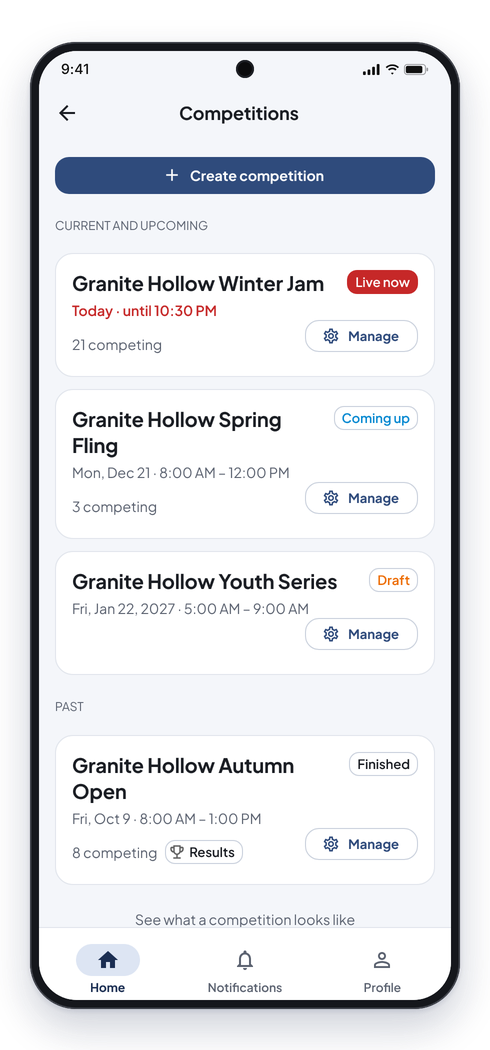
The list shows your current and upcoming competitions, drafts and past ones. At the bottom, See what a competition looks like opens an example competition, so you can try it as a climber and as staff before you make your own.
1. Create It
Tap Create competition and fill in:
- Name, start and end time.
- How many climbs it has. They're numbered #1, #2, #3… and you can add or remove climbs later.
- Divisions (optional), like Open and Youth. Each division gets its own ranking. With no divisions, everyone is ranked together.
- Scoring: pick a starting point and adjust the points. See Competition Scoring.
A new competition starts as a draft that only staff can see.
2. Set Up the Climbs
Open Climbs on the competition's page to see every climb and what it's worth. Tap a climb to:
- Add a photo, so climbers can find it on the wall.
- Give it a grade (optional).
- Change its points.
You can also add a description and rules under Edit setup. Climbers see them on the competition page.
3. Try It With Your Staff (Optional)
Before the start, Test your competition makes a private copy that starts right away, with the same climbs, scoring and divisions. Only your staff can see it. Join it, log some climbs and watch the leaderboard, just like climbers will. Nothing goes into anyone's logbook, and you clean it up when you're done.
4. Publicize It
When it's ready, tap Publicize. Climbers at your gym can then see it and join. Crux sends them notifications:
- When you publicize it, 3 days before, the day before, and when it starts.
- To competitors near the end (1 hour, 30 minutes and 5 minutes before) and when it ends, with where they placed.
The climbs stay secret until the start. Before then, climbers see when it starts and how many climbs there are, but not the climbs themselves.
5. On the Day
Climbers join from your gym's page, even after it has started, right up to the end. They score themselves on their own phones. See Competitions for Climbers.
From the competition's staff page you can:
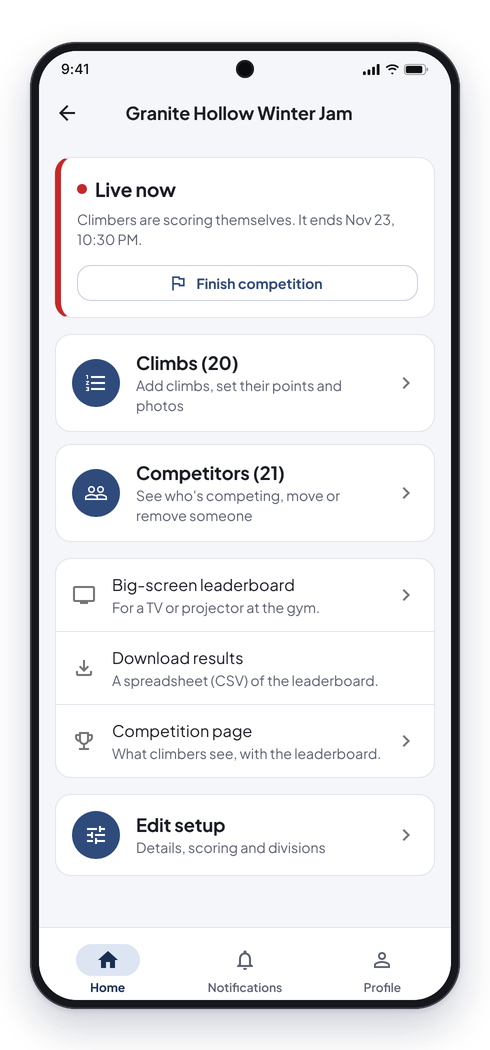
- Open the big-screen leaderboard on a TV or projector. It refreshes as climbers score and shows the time left.
- Manage Competitors: see who's competing, move someone to another division, or remove someone.
- Change any climb's points. If anyone has already scored, Crux tells you how many scores and places will change before you save.
6. Finish It
The leaderboard becomes final automatically when the competition's end time passes. When you're done, tap Finish competition and choose what happens to the climbs:
- Move them to the Climbs tab: they stay up as ordinary climbs. Edit them there to give them names, grades and colours.
- Unset them: they're taken down. Climbers' sends stay in their logbooks.
Download results gives you the leaderboard as a spreadsheet (CSV), with each climber's rank, score, tops, zones and flashes, and their result on every climb.